
How to Update Udyog Aadhaar to Udyam Registration
Last updated: October 2026 | Written by: Aman
Content Reviewed By: Udyog Register Team
Our team prepares and reviews content using practical experience and knowledge of MSME registration, Udyam services, and business compliance. We help businesses understand the registration process and related services in simple language.
We regularly review our content to keep it accurate and updated according to the information available on the official portal and applicable government guidelines.
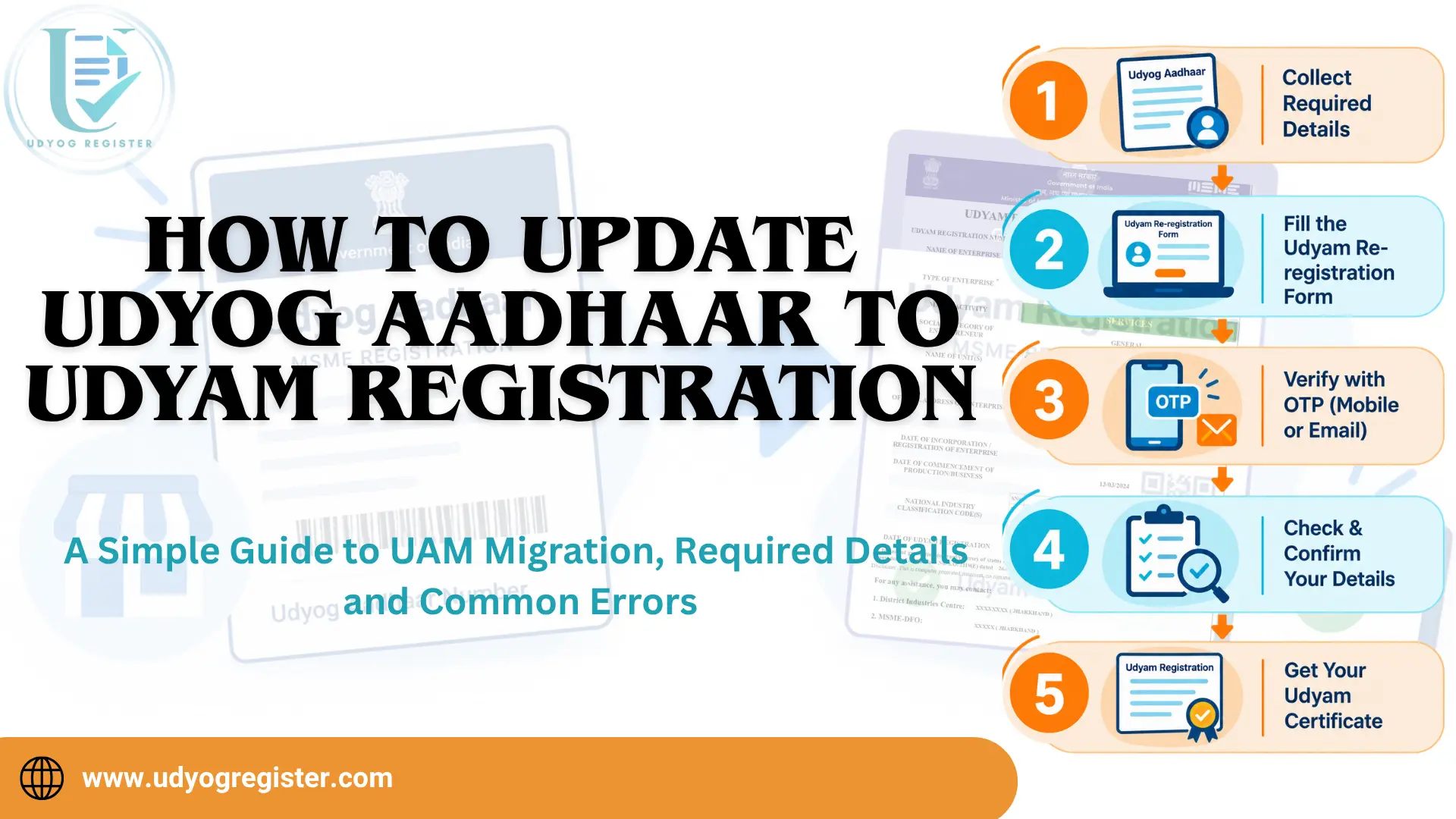
The process to update your old Udyog Aadhaar (UAM) to Udyam registration is very simple. Visit the Udyam registration website, choose the UAM migration option, submit your Udyog Aadhaar number, verify the information via OTP received at the registered mobile number or email, review your PAN and business details, and complete the application. Upon a successful migration of UAM, you will be able to see your new Udyam Registration Number (URN) and Udyam certificate. The migration process is free of cost on the Udyam portal.
If your business has an old Udyog Aadhaar Memorandum (UAM), you need to check the requirements for moving to Udyam Registration. This guide explains how to update Udyog Aadhaar to Udyam Registration, what details you need, and how to solve common problems during the udyam re-registration process.
Table of Contents
- Do you have to migrate from Udyog Aadhaar to Udyam?
- Documents and details you need for UAM migration
- How to migrate Udyog Aadhaar to Udyam Registration
- Step 1: Visit the Udyam Registration Portal
- Step 2: Select the Migration Option
- Step 3: Enter your Udyog Aadhaar Details
- Step 4: Verify Your Details
- Step 5: Check Your Business Details
- Step 6: Submit and Track Your Application
- Why Should MSMEs Update Their Old Udyog Aadhaar?
- Keeps your MSME registration updated
- Serves as proof of MSME status
- Maintains consistency in your business details
- Provides a permanent Udyam Registration Number
- Avoids duplicate Udyam Registrations
- Common errors during Udyog Aadhaar to Udyam migration (and fixes)
- Incorrect Udyog Aadhaar Number
- OTP Not Received
- PAN Verification Failure
- Mismatch in Business Details
- Opting for New Udyam Registration Instead of UAM Migration
- Mistakes to avoid
- Comparison Between Udyog Aadhaar and Udyam Registration
- Need help with Udyam migration?
- Conclusion
- Frequently Asked Questions About Udyog Aadhaar to Udyam Migration
- 1. How can I change Udyog Aadhaar to Udyam Registration?
- 2. Is UAM migration different from updating Udyam Certificate?
- 3. Do I need to pay any fee for UAM migration?
- 4. Can I migrate without my registered mobile number?
- 5. Do I need to upload my old Udyog Aadhaar certificate?
- 6. What should I do if my PAN details do not match?
- 7. Will my Udyog Aadhaar number remain the same?
- 8. Can I apply for a new Udyam Registration if I have forgotten my old UAM number?
- 9. How long does UAM migration take?
- 10. Can Udyog Register help me with UAM migration?
- Official Sources
Do you have to migrate from Udyog Aadhaar to Udyam?
Udyam Registration has replaced the old Udyog Aadhaar system. The validity of the old UAM migration was extended more than once before it ended on 30 June 2022, so a UAM on its own is no longer valid. If you still hold only a UAM, use the migration option on the Udyam portal to get your Udyam Registration Number.
Before you start, check if your business already has a Udyam registration number (URN). If it does, use the same URN. Do not register again.
To migrate your old UAM, visit the Udyam Registration website and search for old Udyog Aadhaar holders.
Documents and details you need for UAM migration
Before starting the udyam migration process, keep these details ready:
- Old Udyog Aadhaar Number: Your existing UAM number.
- Registered mobile number or email: You may need access to the contact details recorded in your earlier registration to receive an OTP.
- Aadhaar details: The required Aadhaar information for the entrepreneur or authorised person, depending on the business structure.
- PAN details: PAN verification is part of the Udyam registration process.
- GSTIN: Keep your GST details ready if applicable to your business.
The migration process may differ from the steps used when applying for a new udyam registration. When you migrate UAM to Udyam, follow the instructions displayed on the screen instead of filling out a new Udyam registration form.
How to migrate Udyog Aadhaar to Udyam Registration
If you wish to update your Udyog Aadhaar or migrate it to Udyam Registration, please follow the steps below. This will help MSMEs—specifically Udyog Aadhaar Memorandum (UAM) holders—re-register under the Udyam system and become eligible for government benefits. Follow these steps to complete the UAM migration process:
Step 1: Visit the Udyam Registration Portal
Go to the Udyam Registration website.
Step 2: Select the Migration Option
Under "For those already having registration as Udyog Aadhaar Memorandum," click "UAM Migration to Udyam."
Note: UAM stands for Udyog Aadhaar Memorandum. It was a basic registration form that MSMEs (Micro, Small, and Medium Enterprises) used to register their businesses before 1 July 2020.
Step 3: Enter your Udyog Aadhaar Details
You need to enter your 12-digit Udyog Aadhaar number.
Step 4: Verify Your Details
You can choose between a mobile number and an email ID for verification. You need to enter the OTP sent to your mobile number or email to verify your details.
Step 5: Check Your Business Details
Review your business details, including PAN verification, and fill in anything the portal asks for.
Step 6: Submit and Track Your Application
Submit your application, track its status on the portal, and download your Udyam certificate once it is ready.
After completing the migration, you can download Udyam Registration Certificate PDF. This certificate replaces your old Udyog Aadhaar registration for future use. It also serves as proof of your MSME registration and can help you access government schemes and other benefits for which your business is eligible.
Why Should MSMEs Update Their Old Udyog Aadhaar?
Udyam Registration replaced the 'Udyog Aadhaar' system in 2020. Businesses that still hold an old Udyog Aadhaar Memorandum should migrate to Udyam Registration and update their details. Here is why this is important:
Keeps your MSME registration updated
Earlier, Udyog Aadhaar was the portal for registering MSMEs, and businesses must migrate to the new Udyam Registration to keep their MSME records up to date.
Serves as proof of MSME status
The Udyam certificate proves that your business is a registered MSME. It is commonly asked for when applying for government tenders, schemes, subsidies, and similar benefits.
Maintains consistency in your business details
When moving from Udyog Aadhaar to Udyam Registration, check your business details carefully in the Udyam Re-Registration form. Make sure your details match your PAN and GST records, wherever applicable. This helps you avoid mistakes and problems during the migration process.
Provides a permanent Udyam Registration Number
Under the old system, MSMEs received a Udyog Aadhaar Number as proof of MSME registration. With Udyam Registration, you get a permanent Udyam Registration Number (URN) and a digital Udyam registration certificate you can download anytime. There is no need to renew it.
Avoids duplicate Udyam Registrations
Migrating your UAM properly means you don't end up with two registrations for the same business. The portal allows only one Udyam Registration per enterprise.
Important Note: Getting registered under Udyam does not guarantee that you will get a loan or subsidy from the government. Various other criteria must be met to get eligible for any government benefits.
Common errors during Udyog Aadhaar to Udyam migration (and fixes)
Incorrect Udyog Aadhaar Number
It often happens that an incorrect number is entered while filling out the form. Therefore, first verify the number present in your existing Udyog Aadhaar record. If you have forgotten your Udyog Aadhaar number, please recover it first.
OTP Not Received
During the process of migration to UAM, the OTP will be sent to the mobile number or email address mentioned during the application process of Udyog Aadhaar. First, make sure you are checking the right phone inbox or email account, and that you selected a mobile or email option on the portal. There may also be a delay in receiving an OTP. Check your spam folder or ask for another OTP after a while. Lastly, if it turns out that you no longer have access to the phone number or e-mail address associated with your UAM, it is best to follow the instructions stated in the Udyam Registration portal instead of continuing trying to request for an OTP.
PAN Verification Failure
PAN verification might fail due to an invalid PAN number, business PAN details, or invalid business details. Double-check your PAN and the legal business name on your PAN card. If the information is incorrect, get it corrected and try again.
Mismatch in Business Details
Sometimes, the business name or address might be different in different records. Check your Udyog Aadhaar, PAN, and GST details for any mismatch. If there is a discrepancy, get it rectified before migrating to Udyam registration and then try again.
Opting for New Udyam Registration Instead of UAM Migration
A very common mistake occurs when individuals who already hold a Udyog Aadhaar Memorandum choose to register as a new Udyam entity. To avoid this, always choose the "UAM Migration to Udyam" option; this prevents the creation of duplicate registrations for the same business.
Mistakes to avoid
- Do not confuse UAM migration with the New Udyam Registration.
- Avoid entering wrong Aadhaar, PAN, or business details.
- Do not submit your previous UAM certificate unless the portal asks you.
- Do not make a new Udyam application if you forget UAM; use the recovery UAM option.
- Do not assume that all the details can be modified while migrating.
Comparison Between Udyog Aadhaar and Udyam Registration
| Feature | Udyog Aadhaar (UAM) | Udyam Registration |
|---|---|---|
| Status | Old system, replaced by Udyam | Current official MSME registration |
| Number | Udyog Aadhaar Number | Udyam Registration Number (URN) |
| Certificate | UAM acknowledgement | Electronic Udyam certificate |
| Verification | Based on investment | Aadhaar verification, with linked PAN and GST where relevant |
| Classification | Based on investment | Based on investment and turnover |
| Fee on official site | Free | Free |
| Validity | Ended on 30 June 2022 after extensions | Permanent, no renewal needed |
Need help with Udyam migration?
If you are having trouble with OTP problems, recovering your UAM number, or simply understanding the process, Udyog Register offers private consultancy for this. Have your UAM details and business information on hand beforehand and ask for a clear explanation of the service and its cost.
You can also complete it yourself by following the directions on the Udyam Registration website.
Conclusion
Check first if your business already has a URN. If it doesn't, go for the migration option meant for existing UAM holders. Fill in your details carefully, finish the OTP step, and fix any PAN or business-detail mismatches it flags. Then check your status again afterward. Doing it in this order saves you from delays and from ending up with a duplicate registration.
If you still have an old Udyog Aadhaar and need help with the migration process, Udyog Register can guide you through the steps. Get assistance with Udyog Aadhaar to Udyam Registration migration by submitting your details through our form. You can also complete the migration yourself for free on the official Udyam Registration portal.
Frequently Asked Questions About Udyog Aadhaar to Udyam Migration
1. How can I change Udyog Aadhaar to Udyam Registration?
You can visit the Udyam Registration portal and check for the option to migrate your existing Udyog Aadhaar (UAM) registration, or you can also check for the provision of migration by using your UAM number, OTP verification, and other details as instructed by the portal.
2. Is UAM migration different from updating Udyam Certificate?
Yes, UAM migration is the process for business owners who have registered their entity under the old Udyog Aadhaar system, while updating a udyam certificate is for those who have already registered under the Udyam registration certificate system.
3. Do I need to pay any fee for UAM migration?
There are no processing charges for migrating your existing UAM via the official Udyam portal. However, there might be some consultancy charges asked by private consultancy services that help with the migration procedure.
4. Can I migrate without my registered mobile number?
If the portal allows email verification for your Udyog Aadhaar account, you can try verifying your account via email for migration purposes. In case you are not able to verify your account details, check for other instructions provided on the udyam portal.
5. Do I need to upload my old Udyog Aadhaar certificate?
The udyam portal generally asks for your old UAM number along with the required set of details for verification. You may not be asked to provide your old certificate unless specified.
6. What should I do if my PAN details do not match?
Make sure that your PAN and other business-related details are correct as per the government database. In case of any discrepancy, update your details in the concerned government portal or contact the support team for further instructions.
7. Will my Udyog Aadhaar number remain the same?
No, on successful Udyog Aadhaar migration, you will be provided with a new Udyam Registration Number (URN), and your previous Udyog Aadhaar Number and new Udyam number will not be the same.
8. Can I apply for a new Udyam Registration if I have forgotten my old UAM number?
Before applying for a new Udyam Registration, try recovering your old Udyog Aadhaar Number. For this go to the forgot udyam registration number option add your details and submit information. You can get your UAM easily. It is advisable not to apply for a new registration if you have forgotten your old Udyog Aadhaar Number; doing so can cause multiple registration issues.
9. How long does UAM migration take?
You have to fill in the required set of details for udyog aadhar migration as instructed by the udyam portal and you can keep a track of your application via the provided tracking link. The duration of the migration process may vary depending on the provided details and the verification process.
10. Can Udyog Register help me with UAM migration?
Yes. Udyog Register offers private consultancy for Udyam Registration, including UAM migration. Contact the team to understand the process and fees. You can also migrate for free on the official portal.
Official Sources
We refer to government websites and official guidelines to prepare and review our content. For information about Udyam Registration, readers can visit these official sources:
- Udyam Registration Portal: https://udyamregistration.gov.in/
- Ministry of Micro, Small and Medium Enterprises: https://msme.gov.in/
We regularly review our content to keep it accurate and updated based on available official information and applicable government guidelines.