How to Download & Print Udyam Certificate PDF Online in 2026
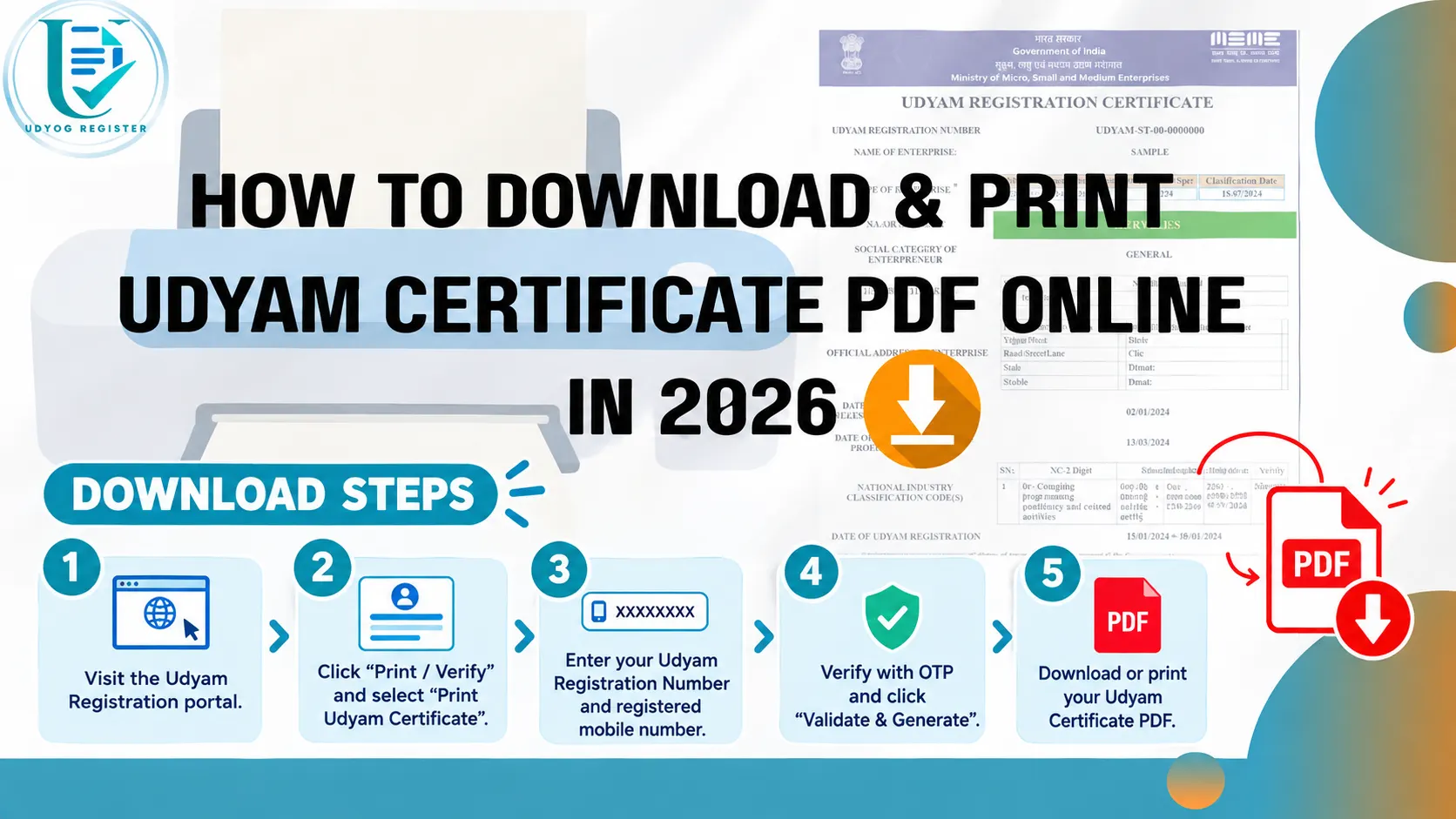
Quick note before you start: You can download the Udyam certificate for free from the government portal. Visit the website, click ‘Print/Verify’ and select the ‘Print Udyam Certificate’ option, complete the Udyami login process, and download the certificate. This article explains the steps clearly. If your mobile number is linked to your Aadhaar, the certificate can be downloaded within 10–15 minutes. The article also covers how business owners can seek paid consultancy services if they prefer not to download the Udyam certificate themselves.
Table of Contents
- How to Download & Print Udyam Certificate PDF Online in 2026
- Udyam Certificate Free Download - Official Government Website Steps (DIY Guide)
- Step-by-Step Guide to Download & Print Udyam Certificate PDF (Udyam Consultancy Website)
- Step 1: Visit the Udyam Website
- Step 2: Click on 'Print Udyam Certificate' from the Navigation Bar
- Step 3: Enter Your Personal Information
- Step 4: Provide Your Udyam Registration Number
- Step 5: Select the Certificate to be Printed
- Step 6: Choose Your OTP Option
- Step 7: Enter Verification Code and Accept Terms
- Step 8: Submit Your Application
- Important Things to Check Before Printing
- Why You Need a Printed Udyam Certificate
- Common Udyam Certificate Download Problems and Fixes
- Conclusion
- Frequently Asked Questions (FAQs)
- Q1: How long does it take to download the Udyam certificate PDF?
- Q2: Can I get the Udyam certificate without my registered mobile number?
- Q3: Do I need a color printout?
- Q4: Is the Udyam Certificate valid for a lifetime?
- Q5: Will the government send a physical hard copy of the Udyam Certificate to my home address?
- Q6: Is the downloaded Udyam Certificate PDF password-protected?
- Q7: Can I print my old Udyog Aadhaar Certificate?
- Q8: What is the use of the QR code printed on the Udyam Certificate?
The Udyam certificate is an essential document if you run a Micro, Small, or Medium Enterprise (MSME) in India. Small business owners should keep a printed copy of their Udyam certificate. You need it to get government benefits. It is also required for banking. Additionally, it ensures compliance.
If they are unable to find their certificate PDF in their email ID or where they saved it, or if they need another copy, they can download it through an online process after following a few steps.
This guide assists MSME owners who are searching for the download process of the Udyam registration certificate and clearly explains the steps on how to download Udyam certificate online through the Udyam registration website.
Udyam Certificate Free Download - Official Government Website Steps (DIY Guide)
If you own an MSME and want to download your Udyam certificate in PDF format, follow these simple steps:
First of all, you need to visit the Udyam registration website.
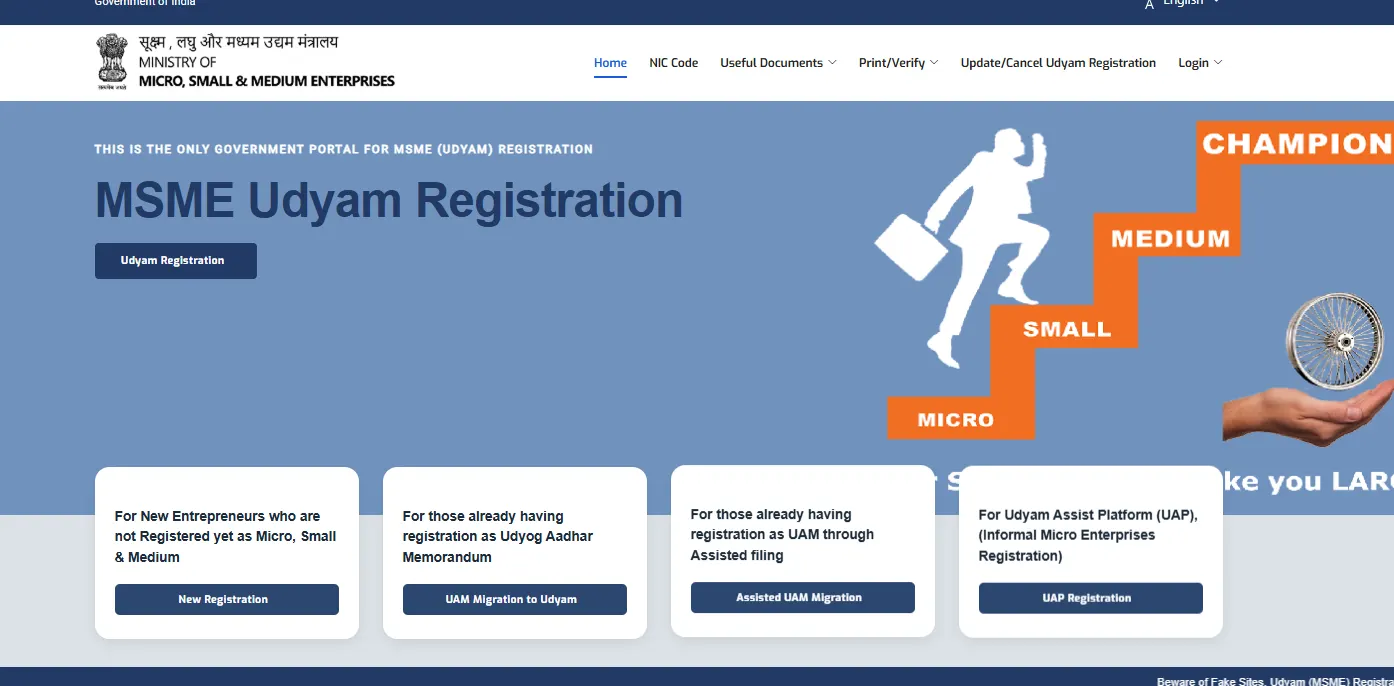
Open the website and click on the “Print/Verify” section in the navigation bar.
After that, click on the “Print Udyam Certificate” option.
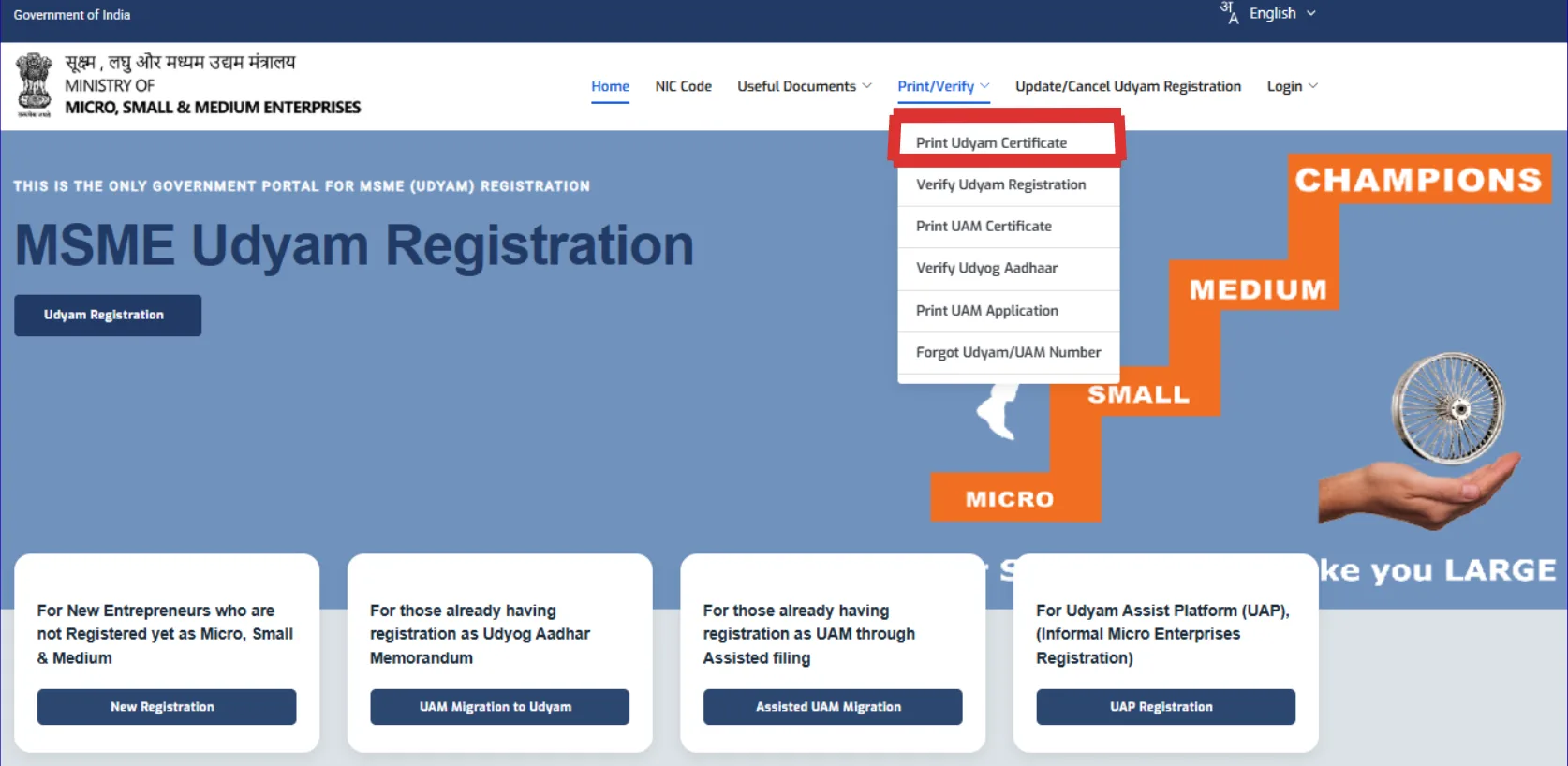
A new page, Udyami Login, opens on your screen, in which you have to fill in the required details like:
- 16-digit Udyam Registration Number that looks like UDYAM-XX-00-0000000
- Mobile Number of the Applicant
Then choose the option of OTP between the Mobile and Email ID, whichever is easier to receive OTP for you.
Then enter the verification code in the box that is given below. Enter the code correctly for the validation process.
Then click on the Validate and generate OTP option.
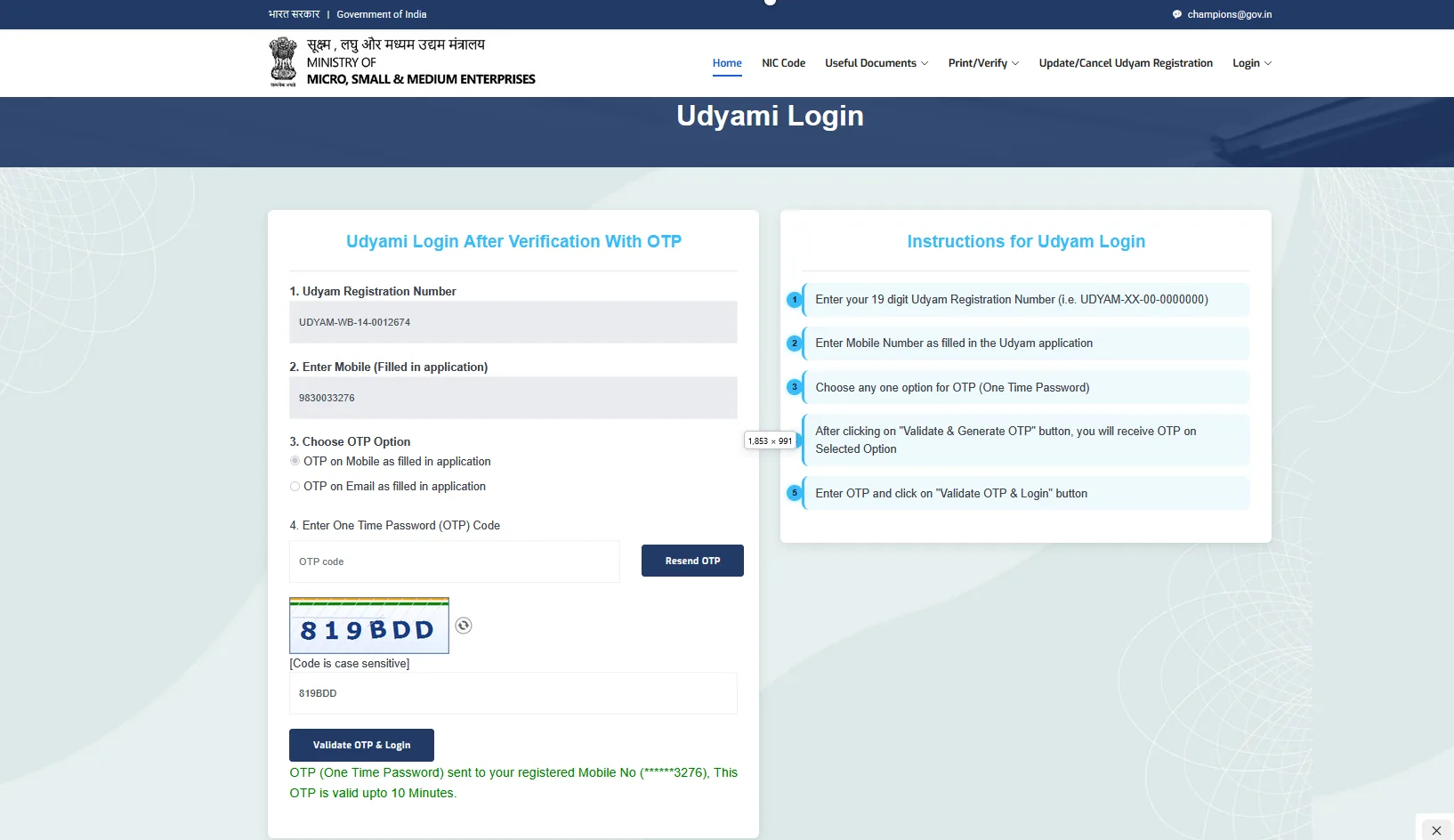
You can get the OTP on the option that you have chosen earlier. Now, enter the OTP and verify the whole process.
Next, log in to your Udyam dashboard. Here you can view all your Udyam Registration details. First, review whether all the details are correct or not, and check whether any update to the Udyam certificate is required or not.
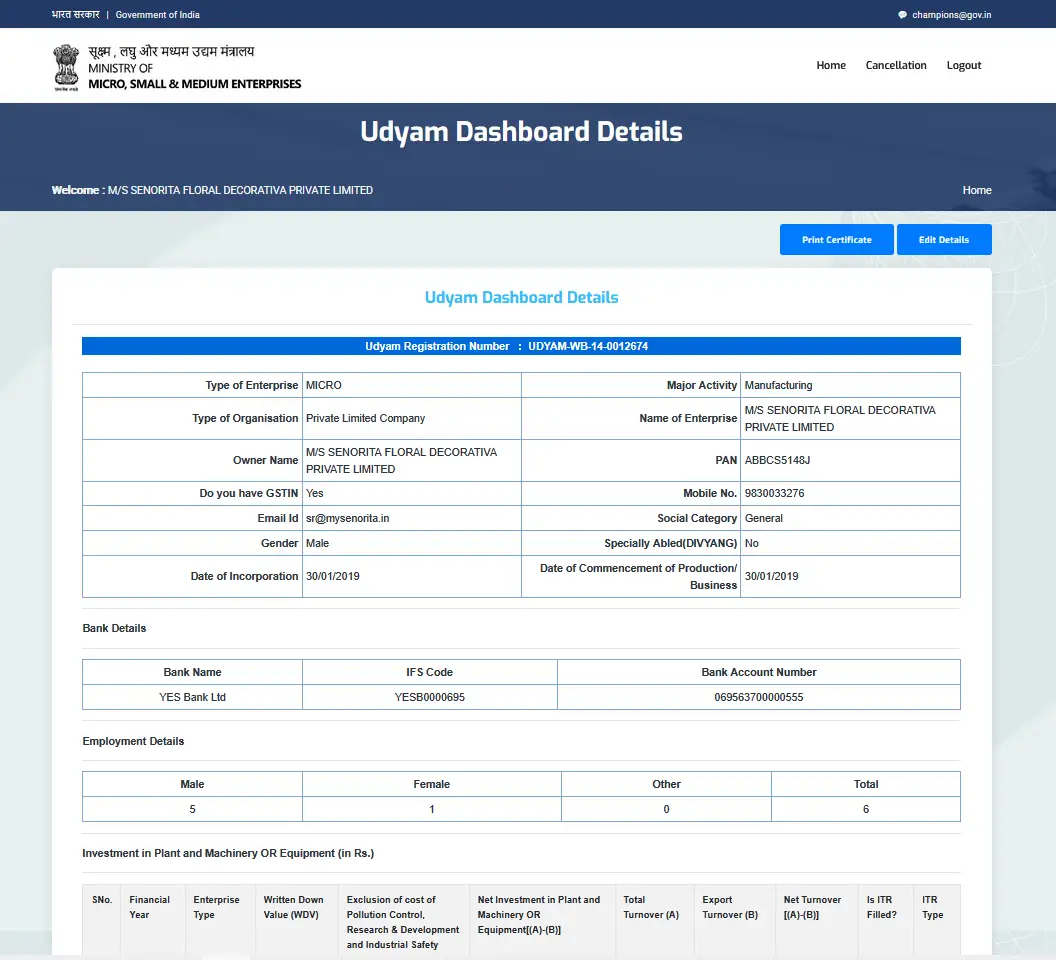
Then, on the right side of the screen, you can see the Print Certificate button. Click on the button to print/download your Udyam certificate in PDF format.
Now a new page is open where you can see the certificate. On the top right side of the page, once again, you can see the print button. Click on the button to save the Udyam certificate in PDF format.
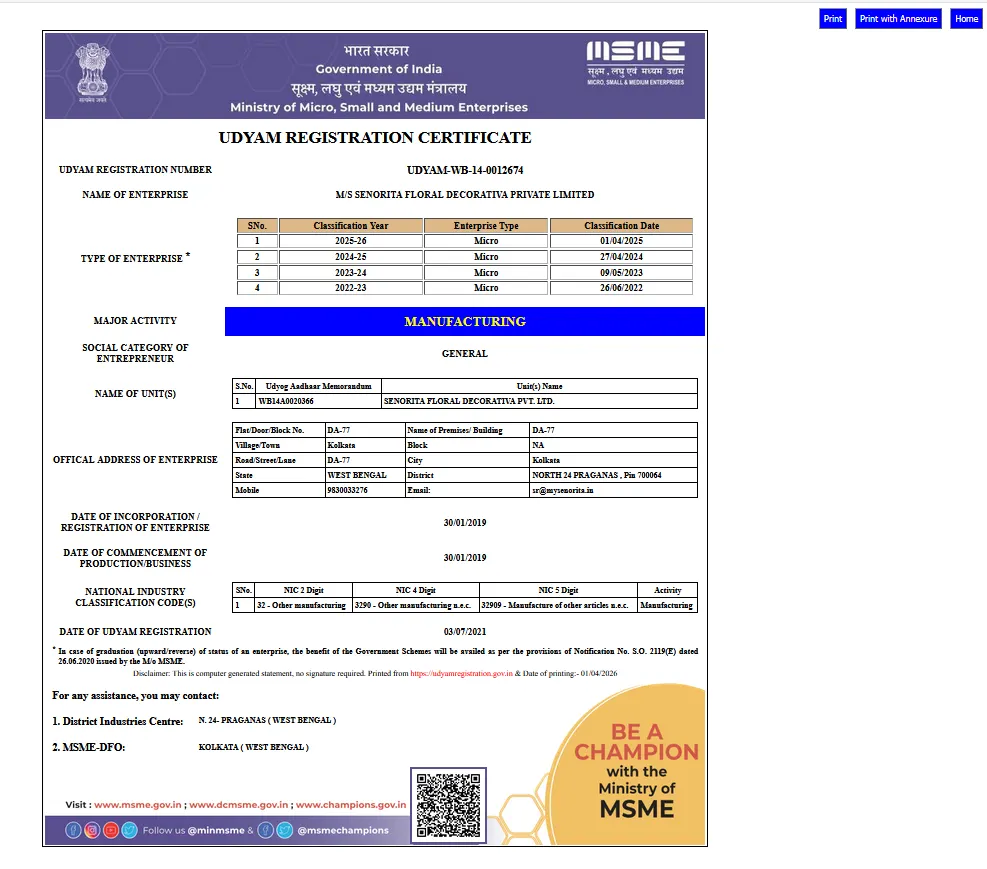
Finally, a new dialogue box appears on your screen where you have to choose Save as PDF, and your Udyam certificate is saved on your system in PDF format. You can visit any nearby cyber cafe or printout shop and take out a soft copy of the downloaded certificate.
Note: You have to enter the same mobile number that you used during registration on the Udyam website. Make sure your number is linked with Aadhaar.
You have completed the MSME certificate download process after following the steps mentioned above.
Well, the steps mentioned above are clear and simple, but if you don't want to do it yourself and want to take help from any private Udyam registration service provider website to make your work easy, then go ahead with this article.
Step-by-Step Guide to Download & Print Udyam Certificate PDF (Udyam Consultancy Website)
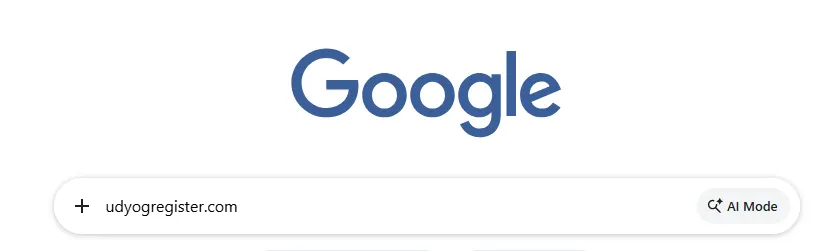
Visit the Udyam Website
Visit the Udyam Registration website , such as Udyog Register, for MSME Certificate download help.
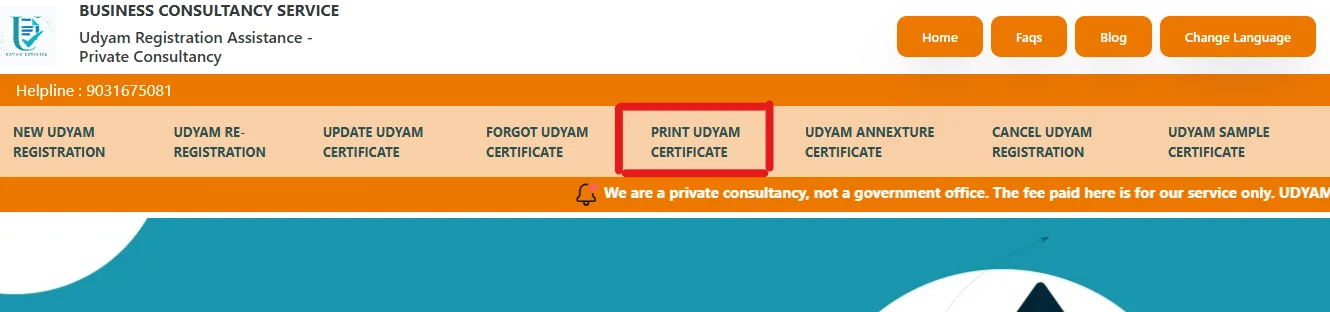
Click on 'Print Udyam Certificate' from the Navigation Bar
On the homepage, go to the top navigation bar and click on the "Print Udyam Certificate" option. A new page will open on your screen that is specifically dedicated to print/download Udyam certificate.
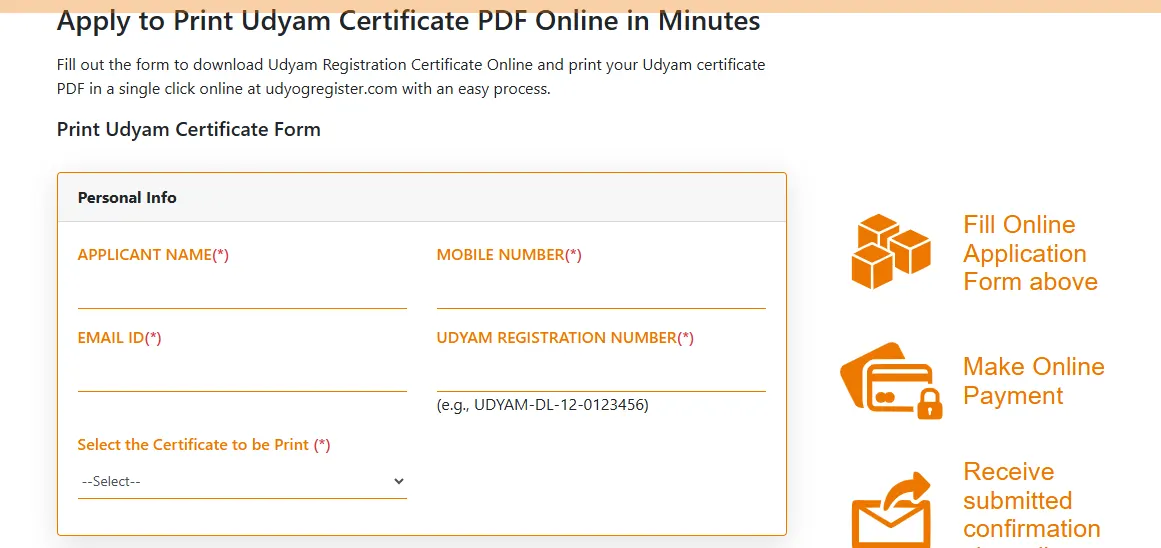
Enter Your Personal Information
In the "Personal Information" section of the print certificate form, fill in your basic contact details:
- Applicant Name
- Mobile Number
- Email ID
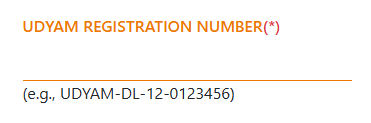
Provide Your Udyam Registration Number
Carefully enter your Udyam Registration Number in the correct format (for example: UDYAM-DL-12-0123456).
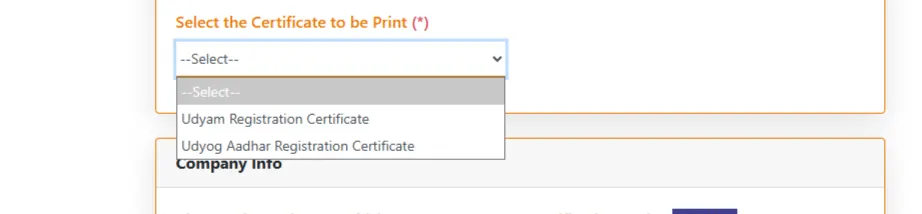
Select the Certificate to be Printed
Click on the drop-down menu and choose the specific document you need:
- Udyam Registration Certificate
- Udyog Aadhaar Registration Certificate
Choose Your OTP Option
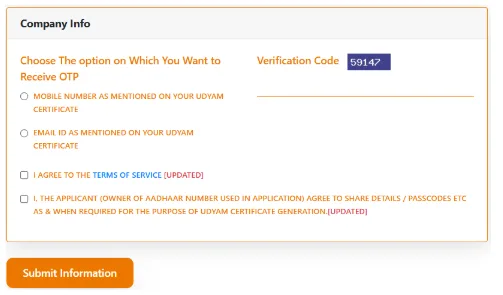
Under the "Company Info" section, select where you would like to receive your OTP (One-Time Password) for verification. You can choose:
- The Mobile Number mentioned on your Udyam Certificate
- The Email ID mentioned on your Udyam Certificate
Enter Verification Code and Accept Terms
- Type the Verification Code (captcha) exactly as shown on the screen.
- Tick the box to say "I AGREE TO THE TERMS OF SERVICE".
- Tick the second box to confirm your consent to share details and passcodes required for generating the certificate.
Submit Your Application
Click on the final Submit Information button at the bottom and pay the consulting charges to proceed further. Once the private consultancy reviews your details, it proceeds with the application form and connects with you to generate your Udyam Certificate. You can receive the certificate in PDF format at your registered email ID.
Once you get the Udyam certificate, you can save it on your system, like on a mobile, laptop, or any cloud server, or take a printout of it and keep it with all your necessary documents.
Important Things to Check Before Printing
Before you download or print your Udyam Registration Certificate, check all the details carefully. This will help you avoid problems later.
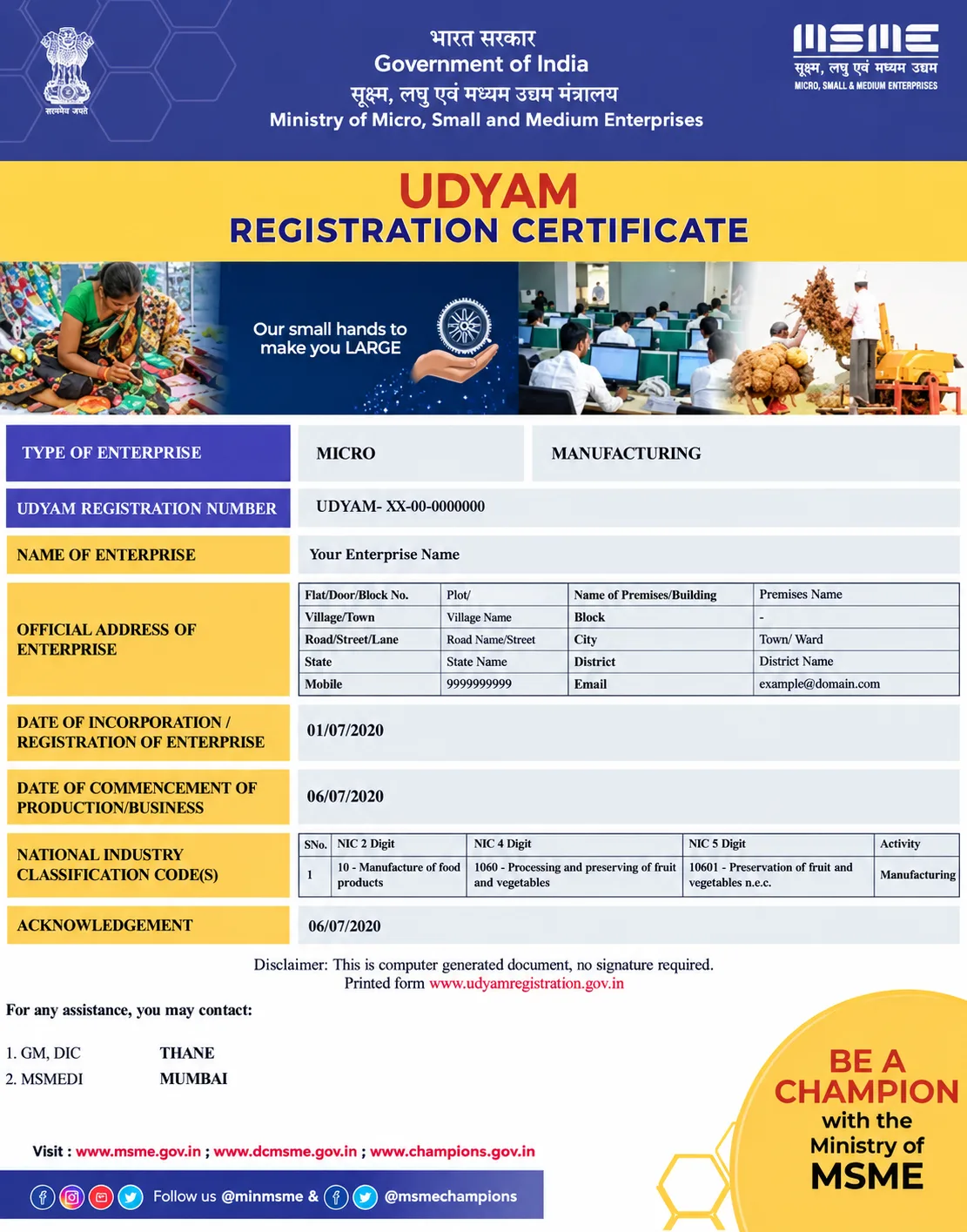
- Enterprise and Applicant Name: Check that your business name and your name are correct and match your PAN and Aadhaar details.
- Udyam Registration Number: Check your 16-digit Udyam Registration Number and make sure it is correct.
- Business Address: Make sure your business address, PIN code, state, and district are correct.
- NIC Code (Business Activity): Check that the NIC codes are correct. These codes show what type of work or business you do.
- Bank Account Details: Check your bank account number and IFSC code carefully.
- Registration and Commencement Date: Make sure the registration date and the date your business started are correct.
- QR Code: Check that the QR code is clear and fully visible. It should not be cut off because it may be scanned to verify your certificate.
- Page Setup for Printing: If you print the certificate from your browser, select A4 size and choose Fit to Page or Default Margins.
This helps make sure that no part of the certificate gets cut off.
Here's a sample of what your Udyam Registration Certificate looks like:
Why You Need a Printed Udyam Certificate
A physical copy of the Udyam certificate is essential for many purposes.
- Government Compliance: Most government schemes for MSMEs ask you to submit a physical copy of the Udyam certificate for approval.
- Banking & Loan Applications: Banks and lenders ask you to submit a physical copy of the Udyam certificate to finance or approve loans for commercial purposes.
- Tender Participation: It is mandatory to keep a physical copy of your Udyam certificate while quoting for public sector and private sector tenders.
- GST & Tax Benefits: You must have a Udyam certificate to avail tax reliefs and concessions.
Common Udyam Certificate Download Problems and Fixes
Sometimes, you may face problems while downloading your Udyam Registration Certificate. Here are some common Udyam certificate download issues and simple ways to fix them.
| Problem | Solution |
|---|---|
| OTP Not Received | Check if your Aadhaar-linked mobile number is active and correct. Update it through UIDAI or visit an Aadhaar enrolment centre if needed. |
| Invalid Udyam Registration Number | Enter your URN exactly as shown on your certificate or confirmation email: UDYAM-XX-00-0000000. Check all letters, numbers, and hyphens. |
| Certificate Not Opening | The certificate opens as a PDF in a new tab. If it does not open, install or use a PDF viewer app to see the certificate or try another browser. On mobile, select a PDF viewer app such as Adobe Acrobat Reader. |
| Aadhaar Validation Error | This may happen due to a mismatch in Aadhaar and PAN details or an inactive PAN. |
Conclusion
Having a printed Udyam Certificate is super important for your business,
especially if you need a bank loan or want to take advantage of government schemes.
At
Udyog Register,
we make getting this certificate incredibly easy. You don't have to worry about
confusing steps or making mistakes.
Our team handles the whole process for you
to save your precious time.
Just fill out the simple form on our website, and we will send the ready-to-print
PDF straight to your email in just a few minutes!
Frequently Asked Questions (FAQs)
Q1: How long does it take to download the Udyam certificate PDF?
If your Aadhaar is linked to your mobile number and the number is active, and you submit the form and verify the OTP, you will receive the PDF in your email within 5 to 10 minutes.
Q2: Can I get the Udyam certificate without my registered mobile number?
Yes, if you don't have access to the phone right now, email works, but the number must still be Aadhaar-linked.
Q3: Do I need a color printout of Udyam Certificate?
No, a standard black-and-white printout is perfectly valid for all government and banking work.
Q4: Is the Udyam Certificate valid for a lifetime?
Yes, the Udyam Certificate comes with lifetime validity. It does not expire, so you do not need to renew it every year. If any changes occur in your business, then you can update your Udyam Certificate.
Q5: Will the government send a physical hard copy of Udyam Certificate to my home address?
No, the MSME department does not send any physical copy by post. You have to download the PDF online and print it yourself.
Q6: Is the downloaded Udyam Certificate PDF password-protected?
No, the Udyam Certificate PDF is not password-protected. You can easily open it on any mobile or computer and take a printout immediately.
Q7: Can I print my old Udyog Aadhaar Certificate?
Yes, you can select the 'Udyog Aadhaar Registration Certificate' option while following the download steps. But always keep in mind the Udyog Aadhaar certificate became redundant, so migrate it to Udyam Registration and do Udyam Re-registration.
Q8: What is the use of the QR code printed on the Udyam Certificate?
The QR code is a security feature. Banks or government officials can scan this QR code to quickly verify your business details directly from the official MSME database.